
WackyGames.online
A free browser arcade with thousands of games across more than 25 genres. No downloads, no accounts, and it works on phones and Chromebooks.
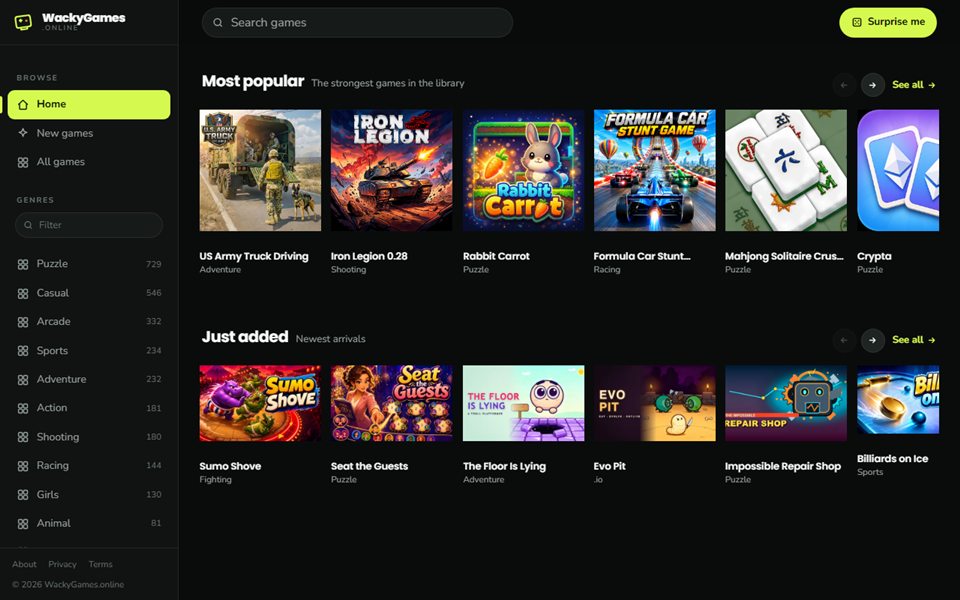
What it is
WackyGames.online is a place to open a browser tab and start playing within a few seconds. The library holds thousands of games, all supplied through licensed publisher agreements, and it is free because it carries ads.
My goal was a front page that feels like a proper game store: fast, easy to browse and easy to leave a game and pick another.
Walkthrough
- Start on HomeTwo shelves greet you: Most popular, for the strongest games in the library, and Just added, for the newest arrivals. Each has arrows to slide through and a See all link.
- Pick a genreThe sidebar lists every genre with a count, from Puzzle and Casual to Racing, Shooting and Sports. There is a filter box if the list is long.
- SearchThe search bar at the top finds games by name as you type.
- Feeling lucky?The Surprise me button picks a random game, which is a good way to find something you would never have searched for.
- PlayClick any game and it opens right on the page. There is nothing to install and no account to create.
How it's built
- The whole site is a single HTML file with no framework, so it loads quickly on slow connections and old devices.
- The game catalog arrives from a licensed games feed. The hosting layer forwards that request from my own domain, so the browser treats it as a normal same-site request and nothing gets blocked.
- One canonical address, www.wackygames.online, with the bare domain redirected to it. That matters because the ad network verifies the exact hostname.
- The ad authorization file lists more than 800 approved sellers, and I checked every record by line.
- Search basics are in place too: a sitemap, a robots file and a social preview image.